
Metrobank has rolled out four new security controls in its mobile banking app, adding barriers that can slow or stop unauthorized transactions as scammers increasingly target customers through phishing, account takeovers, and other social engineering schemes.
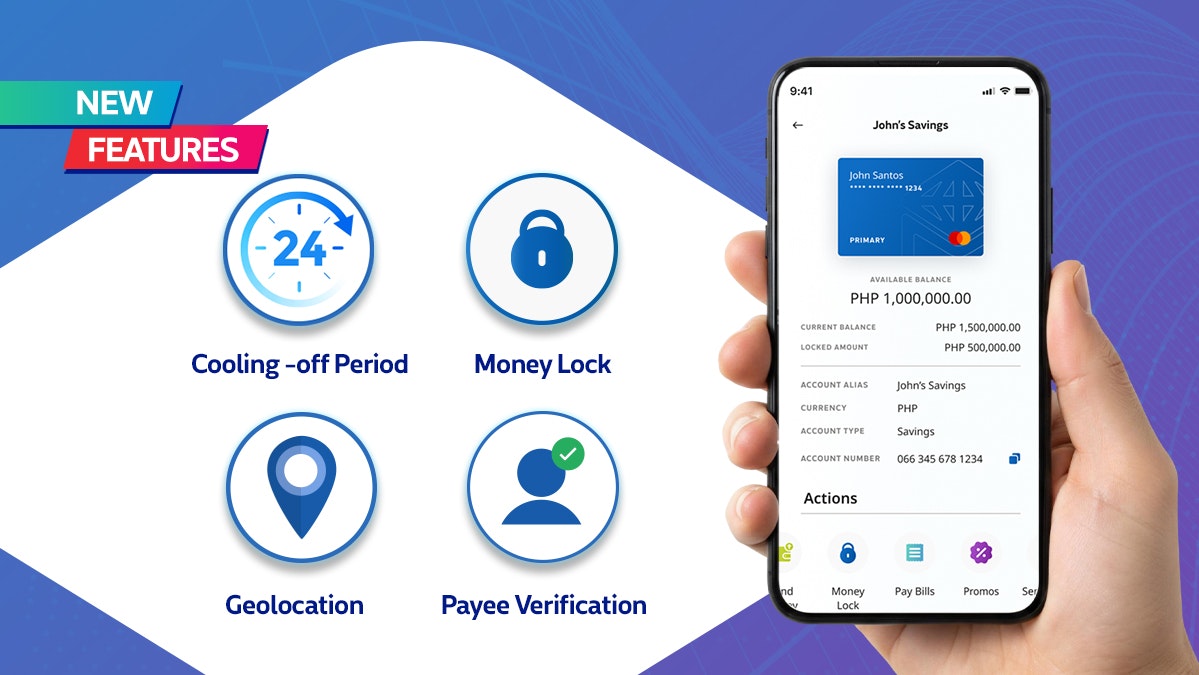
The new safeguards include a 24-hour cooling-off period after critical account changes, Money Lock, geolocation checks, and payee verification.

Rather than relying only on warnings telling customers not to share passwords or one-time PINs, the new Metrobank security features illustrate how fraud prevention is increasingly being built directly into the digital banking experience.
Metrobank, citing Bangko Sentral ng Pilipinas (BSP) data, said social engineering attacks including phishing, account takeovers, and identity theft accounted for 76% of reported cyber fraud losses in 2025.
A 24-hour window before money can move
One of the biggest changes is Metrobank’s Cooling-Off Period.
When critical security information such as a password or registered device is changed, the app automatically imposes a 24-hour restriction on transactions. The additional time is designed to give customers an opportunity to notice suspicious account changes and report them before funds can be moved.
The feature also reflects a broader regulatory shift in Philippine banking.
Under BSP Circular No. 1213, financial institutions are required to implement safeguards including a 24-hour transaction pause after key account changes. The rules form part of the implementation of the Anti-Financial Account Scamming Act (AFASA).
This means measures that once depended largely on customers recognizing a scam early are increasingly being supplemented by restrictions at the platform level.
Customers can lock money inside their accounts
Metrobank’s Money Lock feature takes another approach by allowing customers to secure part or all of their available balance inside the app.
Once funds are locked, they cannot be transferred or used for transactions, including scheduled transactions, until the customer unlocks them.
This creates another layer between account access and actual fund movement. A compromised login, for example, would not necessarily give a fraudster immediate access to money that the customer has already locked.
Metrobank advises users to leave enough available funds outside Money Lock for upcoming or scheduled payments.
Location and recipient checks add more friction
Two other controls focus on identifying suspicious transactions before they are completed.
Metrobank’s geolocation check compares transactions with information from the customer’s registered mobile device and its location. Unusual or inconsistent activity can then be flagged to help prevent unauthorized transactions.
Payee Verification, meanwhile, addresses a different problem: sending money to the wrong recipient.
Before a transfer to another Metrobank account is completed, the app shows a masked version of the recipient’s registered account name, giving customers another opportunity to confirm who will receive the money.
Banks are putting more responsibility on the technology
Digital banking security still depends heavily on customers protecting their credentials and recognizing scams, especially when fraudsters manipulate victims into willingly providing sensitive information.
But the latest controls demonstrate a shift in how that risk is being managed.
Instead of assuming every transaction made through valid credentials is legitimate, banks are adding mechanisms that can delay transactions, restrict access to funds, verify recipients, and detect unusual activity.
For customers, that can mean a little more friction when changing account settings or moving money. For scammers, however, those extra steps create additional barriers between gaining access to an account and successfully taking the funds.
As social engineering becomes harder to address through warnings alone, the next layer of digital banking security is increasingly being designed into the app itself.